
Busoga One Radio Management System
A comprehensive platform for streamlining radio station operations across multiple departments.
Introduction to BORMS
Welcome to the comprehensive documentation for the Busoga One Radio Management System (BORMS), a unified digital platform designed to streamline operations across multiple departments of Busoga One Radio.
What is BORMS?
The Busoga One Radio Management System (BORMS) is an integrated software solution that manages all aspects of radio station operations, from scheduling programs and tracking advertising mentions to handling client accounts and managing on-air content.
Purpose of This Documentation
This documentation serves as a complete reference for:
- Understanding the system architecture and components
- Following proper workflows for different departments
- Learning how to use the system effectively based on your role
- Troubleshooting common issues and questions
Core Features
BORMS provides seamless integration across the following key areas:
Client Management
Track clients, contacts, and business details with comprehensive profiles and interaction history.
Learn MoreProgramming
Schedule shows, segments, and content blocks with an intuitive calendar interface.
Learn MoreFinancial Tracking
Monitor payments, generate invoices, and track revenue across different service offerings.
Learn MoreReporting
Generate insights across all aspects of station operations with customizable reports.
Learn MoreGetting Started
Depending on your role at Busoga One Radio, you may want to start with one of these guides:
- Administrator Guide - For system administrators
- Station Manager Guide - For station management
- Front Desk Guide - For customer-facing staff
- Presenter/DJ Guide - For on-air talent
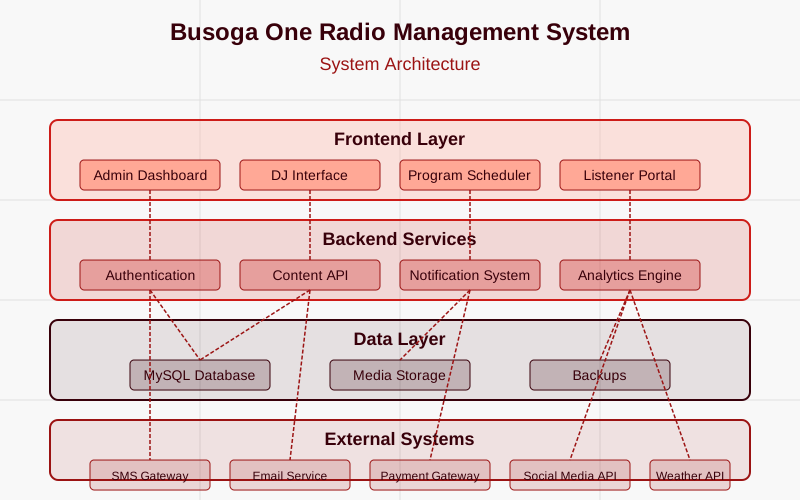
System Architecture
For a technical overview of how BORMS is built, check out the System Architecture document. This explains the technologies used, system structure, and integration points.
User Roles and Permissions
BORMS implements a comprehensive role-based access control system to ensure users can access only the functionality required for their responsibilities.

Each user in the system is assigned one or more of the following roles, which determine their access level:
Workflow Process
BORMS facilitates smooth operations through standardized workflows that guide users through each process:

Key Workflow Steps
Client Intake Process
When a new client approaches the station, front desk staff collect all relevant business information and requirements. This includes contact details, business information, and specific service needs.
Responsible role: Front Desk
System forms: Client Registration, Service Request
Contract & Billing Process
Based on client requirements, appropriate service packages are suggested and a contract is prepared. Payment terms, schedules, and delivery details are agreed upon and documented in the system.
Responsible role: Front Desk, Station Manager
System forms: Contract Generator, Payment Schedule
Content Creation Process
After contract approval, the content creation process begins. Scripts are drafted, revised, and finalized for recording. For pre-recorded content, studio time is allocated for production.
Responsible role: Content Team, Presenter/DJ
System forms: Script Template, Recording Schedule
Approval Process
All content goes through an approval workflow to ensure quality and compliance with broadcasting standards. Multiple stakeholders may need to sign off before content is cleared for air.
Responsible role: Station Manager, Administrator
System forms: Content Approval, Compliance Checklist
Broadcasting Process
Approved content is scheduled for broadcast according to the programming calendar. Presenters/DJs receive notification of mentions and content to be delivered during their shows.
Responsible role: Presenter/DJ
System forms: Program Schedule, Mention List
Reporting Process
After broadcast, comprehensive reports are generated to track delivered content, mentions, and financial transactions. These reports are used for client billing, performance tracking, and business analytics.
Responsible role: Station Manager, Administrator
System forms: Delivery Report, Financial Summary
System Features & Modules

Client Management
The Client Management module provides a comprehensive database of all clients, with detailed profiles including contact information, interaction history, and service preferences.
Key capabilities include:
- Detailed client profiles with contact information
- Interaction history and communication logs
- Document attachment for contracts and agreements
- Client segmentation and categorization
- Automated reminders for follow-ups and renewals
Programming
The Programming module handles the scheduling of all shows, segments, and content blocks using an intuitive calendar interface.
Key capabilities include:
- Drag-and-drop program scheduling
- Recurring program templates
- Conflict detection and resolution
- Integration with DJ Mentions module
- Program calendar with multiple views (daily, weekly, monthly)
DJ Mentions
The DJ Mentions module manages all paid announcements, tracking their scheduling, delivery, and reporting.
Key capabilities include:
- Mention scripting and approval workflow
- Scheduling within specific time blocks
- Real-time delivery tracking
- Performance analytics and reports
- Mobile notifications for on-air talent
Financial Tracking
The Financial Tracking module handles all monetary aspects including invoicing, payment processing, and revenue reporting.
Key capabilities include:
- Automated invoice generation
- Payment tracking and reconciliation
- Revenue forecasting and analysis
- Integration with accounting systems
- Financial performance dashboards
Content Approvals
The Content Approvals module implements multi-stage approval workflows for all on-air content.
Key capabilities include:
- Customizable approval workflows
- Role-based approval assignments
- Version tracking and change history
- Compliance checklist integration
- Digital signature support
Reporting
The Reporting module generates insights across all aspects of station operations with customizable reports.
Key capabilities include:
- Interactive dashboards and visualizations
- Customizable report templates
- Scheduled report generation and distribution
- Export in multiple formats (PDF, Excel, CSV)
- Advanced filtering and data segmentation
Broadcasting Process
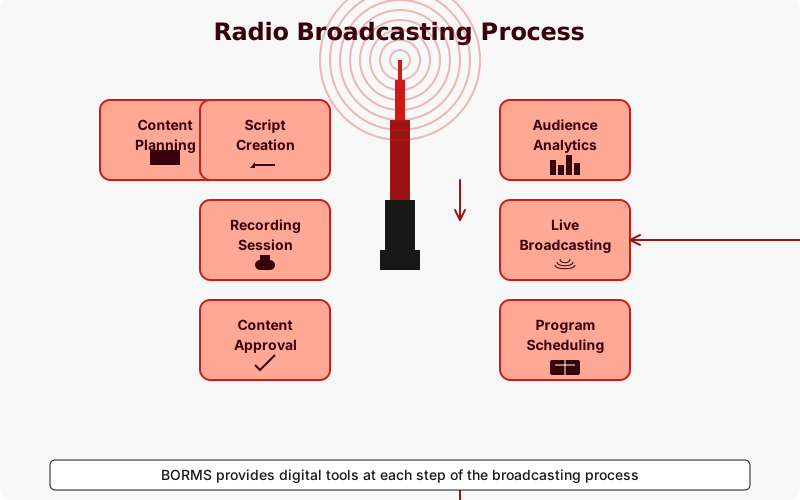
Planning Phase
The planning phase involves content strategy, scheduling, and resource allocation. Program directors and station managers collaborate to determine the optimal content mix and timing.
Key activities include:
- Content calendar development
- Audience targeting and segmentation
- Resource scheduling and allocation
- Paid mention integration planning
Production Phase
The production phase involves script creation, recording sessions, and content preparation. This includes both live show planning and pre-recorded content creation.
Key activities include:
- Script writing and revision
- Voice talent scheduling
- Recording and editing sessions
- Music and sound effect integration
- Quality control and approvals
Broadcast Phase
The broadcast phase involves the actual on-air delivery of content, including live presentations, pre-recorded segments, and scheduled mentions.
Key activities include:
- Program schedule execution
- Live show management
- Mention delivery and tracking
- Technical quality monitoring
- Emergency content management
Analytics Phase
The analytics phase involves monitoring performance, gathering audience data, and producing reports to optimize future content and operations.
Key activities include:
- Audience size and engagement tracking
- Content performance analysis
- Mention delivery verification
- Financial performance assessment
- Trend identification for content planning
Development Timeline
The BORMS project follows a phased development approach with clear milestones:

Need Help?
If you encounter any issues or have questions about using BORMS, please contact your system administrator or refer to the appropriate section in this documentation.