
Finance
The Finance module of the Busoga One Radio Management System (BORMS) manages all financial transactions, billing operations, and revenue tracking. This module ensures accurate invoicing, payment processing, and financial reporting while maintaining complete financial transparency.
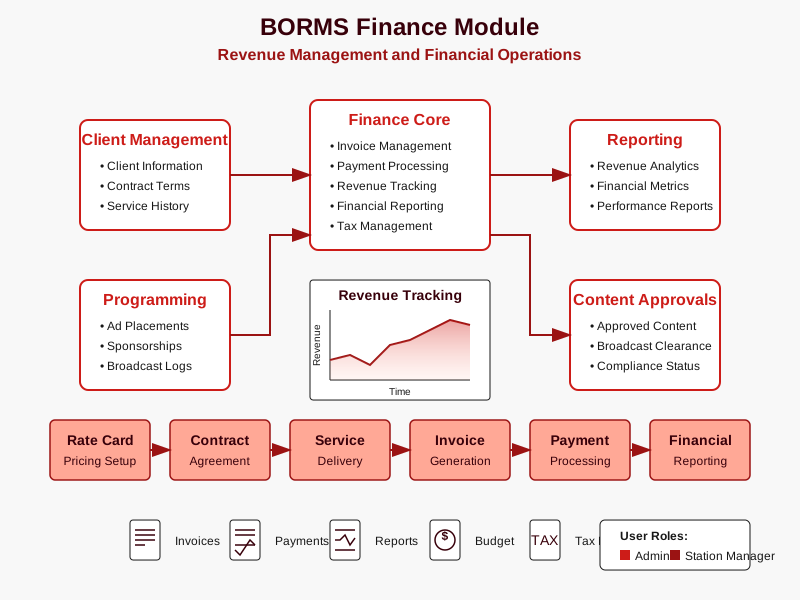
Module Overview
The Finance module is the financial backbone of BORMS, handling all monetary aspects of radio station operations, including:
- Client billing and invoice generation
- Payment processing and tracking
- Revenue recognition and accounting
- Financial reporting and analytics
- Budget management and expense tracking
- Rate card management and pricing
Rate Cards and Pricing
BORMS maintains customizable rate cards for different advertising services and time slots:
| Time Slot | 30-Second Ad | 60-Second Ad | Sponsorship (15 min) | Live Mention |
|---|---|---|---|---|
| Morning Drive (6am-10am) | $85 | $150 | $500 | $45 |
| Midday (10am-3pm) | $65 | $110 | $350 | $35 |
| Afternoon Drive (3pm-7pm) | $80 | $140 | $450 | $40 |
| Evening (7pm-12am) | $50 | $90 | $300 | $30 |
| Weekend | $60 | $100 | $350 | $35 |
The system allows for custom pricing through volume discounts, long-term contracts, and special packages:
Volume Discounts
- 10-19 ads per week: 5% discount
- 20-29 ads per week: 10% discount
- 30-49 ads per week: 15% discount
- 50+ ads per week: 20% discount
Volume discounts are automatically calculated by the system when a client reaches the specified threshold. Discounts apply to the base rate before any other adjustments or packages.
Contract Length Discounts
- 3-month contract: 5% additional discount
- 6-month contract: 10% additional discount
- 12-month contract: 15% additional discount
Contract discounts can be combined with volume discounts for maximum savings. Contracts require a signed agreement and a minimum weekly ad commitment.
Special Advertising Packages
- New Business Package: 10 ads per week for 4 weeks at 25% discount
- Event Promotion Package: 20 ads over 2 weeks with 2 live interviews
- Brand Builder Package: Daily sponsorship of a specific feature for one month
- Community Partner Package: Reduced rates for non-profit organizations
Special packages are pre-configured in the system with specific pricing and can be applied to client invoices with a single selection.
Invoice Management
The invoice management process follows a structured workflow to ensure accurate and timely billing:
Contract Setup
Create client advertising agreement with services, rates, and terms.
Station ManagerService Delivery
Track actual advertising services delivered (ads, sponsorships, etc.).
Front Desk Presenter/DJInvoice Generation
Create detailed invoice with itemized services and applicable discounts.
Admin Station ManagerInvoice Delivery
Send invoice to client via email, mail, or client portal.
Front DeskPayment Processing
Record payments received and apply to appropriate invoices.
Admin Front DeskFollow-up
Track outstanding invoices and send reminders for unpaid balances.
Front Desk Station ManagerPayment Methods
BORMS supports multiple payment methods to accommodate client preferences:
- Electronic Funds Transfer (EFT): Direct bank-to-bank transfers
- Credit/Debit Card: Secure online payment portal
- Check/Cheque: Physical payment processing
- Mobile Money: Integration with local mobile payment platforms
- Cash: In-person payment at station offices
Each payment method is tracked in the system with appropriate reconciliation procedures and reporting.
Financial Reporting
The Finance module generates comprehensive reports for financial analysis and decision-making:
Revenue Reports
- Daily Sales Report: Revenue generated in the last 24 hours
- Weekly Revenue Summary: Breakdown of revenue by service type
- Monthly Revenue Analysis: Detailed revenue trends and comparisons
- Quarterly Revenue Report: Strategic overview of revenue performance
- Annual Revenue Statement: Comprehensive yearly revenue analysis
Client Financial Reports
- Client Revenue Report: Revenue generated by each client
- Aging Report: Outstanding invoices by age (30/60/90 days)
- Client Payment History: Record of all client payments
- Top Client Report: Analysis of highest-revenue clients
- Client Retention Value: Financial impact of repeat business
Operational Financial Reports
- Timeslot Revenue Report: Revenue by broadcast time segment
- Program Revenue Report: Revenue attributed to specific shows
- Ad Type Analysis: Revenue breakdown by advertising format
- Discount Impact Report: Analysis of discount effects on revenue
- Sales Pipeline Report: Projection of future revenue from pending deals
Budget Management
BORMS includes tools for creating and tracking operational budgets:
- Budget Creation: Set revenue targets and expense limits by category
- Budget Tracking: Real-time monitoring of actual vs. budgeted figures
- Variance Analysis: Identification of significant deviations from budget
- Expense Approval: Workflow for expense requests and approvals
- Budget Revisions: Tools for adjusting budgets based on changing conditions
Finance Module Best Practices
- Generate invoices promptly after service delivery to optimize cash flow
- Reconcile payment records daily to maintain accurate financial data
- Review aging reports weekly to address overdue payments quickly
- Analyze revenue reports monthly to identify trends and opportunities
- Maintain clear documentation of all custom pricing arrangements
- Implement consistent follow-up procedures for unpaid invoices
Access Permissions
The Finance module's features are restricted based on user roles:
| User Role | View Invoices | Create Invoices | Process Payments | Modify Rates | Access Reports |
|---|---|---|---|---|---|
| Admin | All Invoices | ✓ | ✓ | ✓ | All Reports |
| Station Manager | All Invoices | ✓ | ✓ | View Only | Limited Reports |
| Front Desk | Limited View | ✗ | Record Only | ✗ | Basic Reports |
| Presenter/DJ | ✗ | ✗ | ✗ | ✗ | ✗ |
System Integration
The Finance module integrates with other BORMS components:
- Client Management: Shares client data and contact information
- Programming: Tracks advertising placements for billing
- Content Approvals: Ensures only approved content is billed
- Reporting: Provides financial data for comprehensive station reports
The integration ensures seamless data flow between modules, eliminating redundant data entry and maintaining data consistency throughout the system.
Tax and Regulatory Compliance
BORMS helps maintain financial compliance with relevant regulations:
- Tax Calculation: Automatically applies appropriate tax rates to invoices
- Tax Reporting: Generates reports for tax filing and compliance
- Audit Trail: Maintains detailed records of all financial transactions
- Financial Controls: Implements appropriate separation of duties
- Compliance Reporting: Produces reports required by regulatory authorities