
Client Management
The Client Management module is a core component of the Busoga One Radio Management System (BORMS), providing tools to manage all client relationships, track interactions, and maintain accurate client records. This comprehensive module helps front desk staff and management maintain professional relationships with advertisers, sponsors, and other stakeholders.
Module Overview
The Client Management module serves as the central hub for all client-related activities in BORMS, providing the following key functionality:
- Client database with comprehensive contact information
- Interaction history tracking and client notes
- Client categorization and classification system
- Lead tracking and prospect management
- Client activity monitoring and reporting
- Integration with Finance and Programming modules
Client Types and Classification
BORMS allows for the classification of clients into different categories to facilitate tailored communication and service:
| Client Type | Description | Engagement Level |
|---|---|---|
| Active Advertiser | Currently running ads or sponsorships | High - Regular contact |
| Past Advertiser | Previously ran ads but not currently active | Medium - Periodic follow-up |
| Prospect | Potential client who has expressed interest | High - Active pursuit |
| Partner | Organizations with formal partnership agreements | High - Structured engagement |
| Community Organization | Non-profits, government entities, or community groups | Medium - As needed engagement |
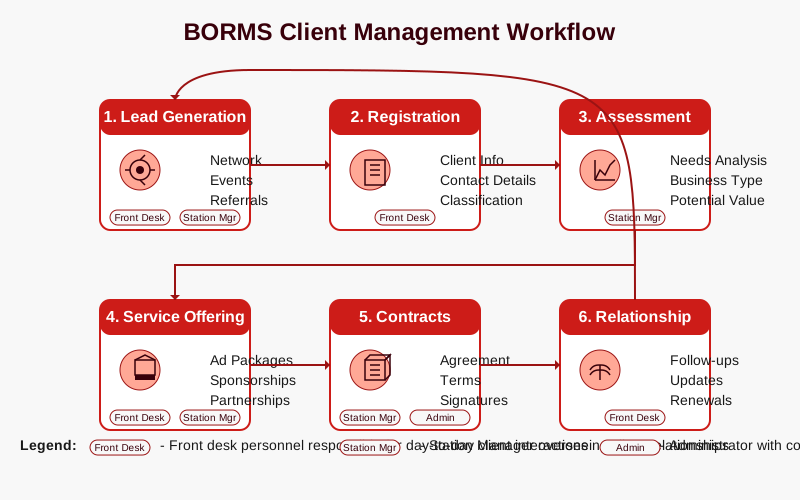
Client Management Workflow
The client management process follows a structured workflow that ensures consistent and professional client interactions:
Lead Generation
Identify potential clients through networking, referrals, or marketing activities.
Front Desk Station ManagerClient Registration
Enter client information into the BORMS database with complete contact details.
Front DeskClient Assessment
Evaluate client needs and classify them according to business type and potential.
Station ManagerService Offering
Present appropriate advertising or partnership packages.
Front Desk Station ManagerContract Management
Create, review, and manage client contracts and service agreements.
Station Manager AdminRelationship Maintenance
Regular follow-ups, updates, and relationship-building activities.
Front DeskClient Data Management
BORMS maintains comprehensive client records that include:
Basic Client Information
- Client ID: Unique identifier assigned by BORMS
- Client Name: Official registered business name
- Client Type: Categorization based on business relationship
- Status: Active, Inactive, Prospect, or On Hold
- Registration Date: Date the client was added to BORMS
- Last Activity Date: Date of most recent interaction or transaction
Contact Information
- Primary Contact Person: Name and title of main point of contact
- Secondary Contacts: Additional contacts with specific roles
- Phone Numbers: Office, mobile, and alternative numbers
- Email Addresses: Primary and alternative email contacts
- Physical Address: Office location with street, city, and postal code
- Communication Preferences: Preferred contact methods and times
Business Information
- Industry Sector: Primary business category
- Business Size: Small, Medium, or Large Enterprise
- Products/Services: Brief description of client offerings
- Target Audience: Client's customer demographic information
- Operating Hours: Business hours for scheduling contact
- Social Media Profiles: Links to client's online presence
Activity and Interaction History
- Meeting Notes: Records of all client meetings and discussions
- Communication Log: Emails, calls, and other correspondence
- Contract History: Past and current contractual agreements
- Service History: Previously provided services and campaigns
- Payment History: Record of invoices and payment status
- Follow-up Schedule: Planned future engagement activities
Access Permissions
Client information access is controlled by role-based permissions in BORMS:
| User Role | View Client Data | Add New Clients | Edit Client Info | Delete Client Records | Access Financial Data |
|---|---|---|---|---|---|
| Admin | Full Access | ✓ | ✓ | ✓ | ✓ |
| Station Manager | All Clients | ✓ | ✓ | ✗ | ✓ |
| Front Desk | All Clients | ✓ | Limited Fields | ✗ | Limited View |
| Presenter/DJ | Limited View | ✗ | ✗ | ✗ | ✗ |
Best Practices for Client Management
- Always verify contact information during client interactions
- Document all client communications promptly and accurately
- Schedule regular follow-ups with active and prospective clients
- Review client status and classification quarterly
- Maintain professional communication standards in all interactions
- Respect client confidentiality and data privacy requirements
Client Reporting Features
BORMS provides several built-in reports to help manage and analyze the client database:
- Client Activity Report: Summary of recent interactions by client
- New Client Acquisition Report: Analysis of new client registration trends
- Client Retention Report: Metrics on client retention and churn rates
- Contract Expiry Report: Alerts for upcoming contract renewals
- Client Engagement Report: Analysis of frequency and depth of client interactions
- Client Distribution Report: Breakdown of clients by industry, size, and type
Integration with Other Modules
The Client Management module seamlessly integrates with other BORMS components:
- Finance Module: Client billing history, payment status, and financial reporting
- Programming Module: Linking clients to sponsored programs and advertisements
- Content Approvals: Managing client approval workflows for advertisements
- Reporting: Comprehensive analytics across client activities and engagements