
Database Schema
The Busoga One Radio Management System (BORMS) relies on a robust database structure to efficiently manage all aspects of radio operations. This page outlines the database schema, relationships between tables, and key fields that power the system's functionality.
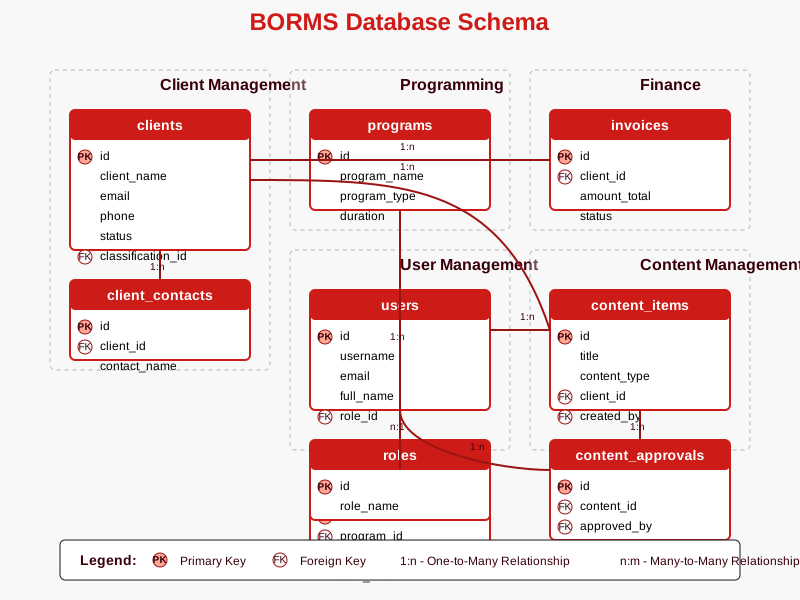
Core Database Tables
The BORMS database is structured around the following core tables that store and manage data across the system:
Client Tables
These tables manage all client-related information in the BORMS system:
- clients - Stores basic client information including name, contact details, and status
- client_contacts - Maintains multiple contact persons for each client
- client_notes - Tracks all client interaction history and notes
- client_classifications - Categorizes clients by type, size, and industry
CREATE TABLE clients (
  id INT PRIMARY KEY AUTO_INCREMENT,
  client_name VARCHAR(100) NOT NULL,
  contact_person VARCHAR(100),
  email VARCHAR(100) UNIQUE,
  phone VARCHAR(20),
  address TEXT,
  status ENUM('active', 'inactive', 'prospect') DEFAULT 'prospect',
  classification_id INT,
  created_at TIMESTAMP DEFAULT CURRENT_TIMESTAMP,
  updated_at TIMESTAMP DEFAULT CURRENT_TIMESTAMP ON UPDATE CURRENT_TIMESTAMP,
  FOREIGN KEY (classification_id) REFERENCES client_classifications(id)
);
Programming Tables
Tables that manage program schedules, shows, and broadcast content:
- programs - Defines radio shows and recurring content
- program_schedules - Maps programs to specific timeslots
- schedule_exceptions - Handles special programming and schedule changes
- program_hosts - Links presenters/DJs to specific programs
CREATE TABLE programs (
  id INT PRIMARY KEY AUTO_INCREMENT,
  program_name VARCHAR(100) NOT NULL,
  description TEXT,
  program_type ENUM('talk', 'music', 'news', 'special', 'sponsored') NOT NULL,
  default_duration INT NOT NULL COMMENT 'Duration in minutes',
  active BOOLEAN DEFAULT TRUE,
  created_at TIMESTAMP DEFAULT CURRENT_TIMESTAMP,
  updated_at TIMESTAMP DEFAULT CURRENT_TIMESTAMP ON UPDATE CURRENT_TIMESTAMP
);
Finance Tables
Tables managing financial transactions, invoicing, and payment tracking:
- invoices - Stores all billing information for clients
- invoice_items - Contains individual line items for each invoice
- payments - Records all payments received from clients
- payment_methods - Lists available payment methods and their settings
CREATE TABLE invoices (
  id INT PRIMARY KEY AUTO_INCREMENT,
  client_id INT NOT NULL,
  invoice_number VARCHAR(50) UNIQUE NOT NULL,
  issue_date DATE NOT NULL,
  due_date DATE NOT NULL,
  amount_total DECIMAL(10,2) NOT NULL,
  status ENUM('draft', 'issued', 'paid', 'partially_paid', 'overdue', 'canceled') DEFAULT 'draft',
  notes TEXT,
  created_at TIMESTAMP DEFAULT CURRENT_TIMESTAMP,
  updated_at TIMESTAMP DEFAULT CURRENT_TIMESTAMP ON UPDATE CURRENT_TIMESTAMP,
  FOREIGN KEY (client_id) REFERENCES clients(id)
);
User Tables
Tables managing system users, permissions, and role-based access:
- users - Contains all user accounts and authentication information
- roles - Defines user roles (Admin, Station Manager, Front Desk, Presenter/DJ)
- permissions - Lists granular system permissions
- role_permissions - Maps permissions to specific roles
CREATE TABLE users (
  id INT PRIMARY KEY AUTO_INCREMENT,
  username VARCHAR(50) UNIQUE NOT NULL,
  password_hash VARCHAR(255) NOT NULL,
  email VARCHAR(100) UNIQUE NOT NULL,
  full_name VARCHAR(100) NOT NULL,
  role_id INT NOT NULL,
  status ENUM('active', 'inactive', 'suspended') DEFAULT 'active',
  last_login TIMESTAMP NULL,
  created_at TIMESTAMP DEFAULT CURRENT_TIMESTAMP,
  updated_at TIMESTAMP DEFAULT CURRENT_TIMESTAMP ON UPDATE CURRENT_TIMESTAMP,
  FOREIGN KEY (role_id) REFERENCES roles(id)
);
Content Tables
Tables storing and tracking broadcast content and approvals:
- content_items - Tracks all content including ads, PSAs, and segments
- content_approvals - Manages the approval workflow for content
- content_categories - Categorizes different types of broadcast content
- content_schedules - Tracks when specific content should air
CREATE TABLE content_items (
  id INT PRIMARY KEY AUTO_INCREMENT,
  title VARCHAR(100) NOT NULL,
  description TEXT,
  content_type ENUM('advertisement', 'psa', 'station_id', 'jingle', 'interview', 'news') NOT NULL,
  duration INT NOT NULL COMMENT 'Duration in seconds',
  file_path VARCHAR(255),
  client_id INT NULL,
  category_id INT NOT NULL,
  approval_status ENUM('pending', 'approved', 'rejected', 'expired') DEFAULT 'pending',
  created_by INT NOT NULL,
  created_at TIMESTAMP DEFAULT CURRENT_TIMESTAMP,
  updated_at TIMESTAMP DEFAULT CURRENT_TIMESTAMP ON UPDATE CURRENT_TIMESTAMP,
  FOREIGN KEY (client_id) REFERENCES clients(id),
  FOREIGN KEY (category_id) REFERENCES content_categories(id),
  FOREIGN KEY (created_by) REFERENCES users(id)
);
Database Relationships
The power of the BORMS database lies in the relationships between tables that create a complete picture of radio operations:
One-to-Many Relationships
- A client can have multiple contacts (clients → client_contacts)
- A client can have multiple invoices (clients → invoices)
- An invoice can have multiple line items (invoices → invoice_items)
- A program can have multiple scheduled instances (programs → program_schedules)
- A user can create multiple content items (users → content_items)
Many-to-Many Relationships
- Programs and hosts (programs ↔ users via program_hosts)
- Roles and permissions (roles ↔ permissions via role_permissions)
- Content items and broadcast schedules (content_items ↔ program_schedules via content_schedules)
Data Integrity Constraints
The BORMS database implements several data integrity constraints to ensure information consistency:
- Primary Keys: Each table has a unique identifier to ensure record uniqueness
- Foreign Keys: Relationships between tables are enforced to maintain referential integrity
- Unique Constraints: Fields like email addresses and invoice numbers are kept unique
- Not Null Constraints: Critical fields are required to have values
- Enumerations: Predefined values for status fields and types to ensure data consistency
- Default Values: Sensible defaults to reduce data entry errors
- Timestamps: Automatic tracking of record creation and updates
Database Backup and Recovery
BORMS includes a robust database backup and recovery strategy:
- Automated Daily Backups: Full database dumps every 24 hours
- Transactional Logs: Continuous logging of database changes for point-in-time recovery
- Offsite Storage: Database backups stored both locally and in secure cloud storage
- Recovery Testing: Regular restoration tests to verify backup integrity
- Retention Policy: Daily backups kept for 30 days, weekly backups for 3 months, monthly backups for 1 year
Database Administrator Notes
For database administrators:
- Database indexing strategy focuses on frequently queried fields
- Query optimization is implemented for complex reporting queries
- Database migrations require approval from the technical lead
- All schema changes must be documented in the change log
Database Access Control
Access to the database is strictly controlled based on user roles:
| Role | Read Access | Write Access | Delete Access |
|---|---|---|---|
| Admin | All tables | All tables | All tables |
| Station Manager | All tables | Limited (No user management) | Limited (Content only) |
| Front Desk | Clients, Programming, Content | Clients, Programming notes | None |
| Presenter/DJ | Programming, Content | Content items, Program notes | None |
Data Entry Guidelines
To maintain data quality and consistency, follow these guidelines when entering data:
- Client Names: Use official registered business names; capitalize properly
- Contact Information: Verify email addresses and phone numbers for accuracy
- Dates: Use consistent YYYY-MM-DD format for all date fields
- Monetary Values: Always enter amounts in the local currency without the currency symbol
- Notes: Be concise, factual, and professional in all system notes