
Reporting
The Reporting module of the Busoga One Radio Management System (BORMS) provides comprehensive analytics, insights, and business intelligence across all aspects of radio operations. This centralized reporting hub enables data-driven decision making for station management and stakeholders.
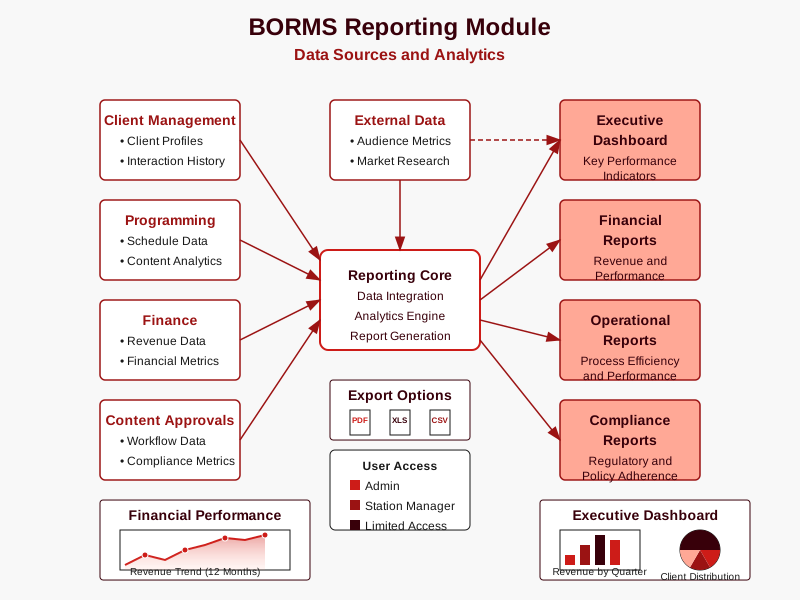
Module Overview
The Reporting module aggregates data from all BORMS components to deliver actionable intelligence:
- Performance metrics across all operational areas
- Customizable dashboards for different user roles
- Standard and ad hoc reporting capabilities
- Historical trend analysis and forecasting
- Export functionality in multiple formats
- Automated report scheduling and distribution
Report Categories
BORMS reporting is organized into several categories to address different operational needs:
| Report Category | Description | Primary Users |
|---|---|---|
| Executive Dashboard | High-level KPIs and performance metrics | Admin, Station Manager |
| Financial Reports | Revenue, expenses, and financial analysis | Admin, Station Manager |
| Programming Reports | Broadcast content and schedule analytics | Station Manager, Presenters |
| Client Reports | Client engagement and advertising metrics | Station Manager, Front Desk |
| Audience Reports | Listener demographics and engagement data | All Staff |
| Compliance Reports | Regulatory and internal policy adherence | Admin, Station Manager |
| Operational Reports | System usage and workflow efficiency metrics | Admin |
Key Performance Indicators (KPIs)
The Reporting module tracks these essential KPIs to measure station performance:
Financial Performance Metrics
- Total Revenue: Overall income from all sources
- Revenue by Client: Income broken down by advertiser
- Revenue by Time Slot: Income distribution across broadcast day
- Average Revenue per Broadcast Hour: Revenue efficiency metric
- Cost per Minute: Production and broadcast cost analysis
- Collection Rate: Percentage of invoiced amount collected
- Days Sales Outstanding (DSO): Average collection period
- Profit Margin: Profitability analysis by program and time slot
Audience Engagement Metrics
- Overall Listenership: Total audience size estimates
- Time Spent Listening (TSL): Average duration of engagement
- Listener Demographics: Age, gender, location breakdowns
- Program Ratings: Audience size by program
- Social Media Engagement: Interaction across digital platforms
- Listener Growth Rate: Audience expansion metrics
- Listener Loyalty: Return frequency and engagement patterns
- Share of Voice: Market position relative to competitors
Content Performance Metrics
- Content Mix Analysis: Distribution of content types
- Talk-to-Music Ratio: Balance between talk and music programming
- Content Freshness: Rotation frequency of content elements
- Commercial Load: Advertising minutes per hour
- Content Compliance Rate: Adherence to regulatory requirements
- DJ Mention Completion: Required sponsor mentions delivered
- Production Turnaround Time: Efficiency in content creation
- Content Quality Ratings: Subjective quality assessments
Operational Efficiency Metrics
- Scheduling Efficiency: Optimization of broadcast schedule
- Content Approval Cycle Time: Duration of approval workflow
- Staff Productivity: Output metrics by role and department
- System Uptime: Reliability of technical infrastructure
- Resource Utilization: Usage efficiency of studio and equipment
- Workflow Completion Rates: Process reliability metrics
- Error Rates: Technical and operational issues tracking
- Staff Training Metrics: Skills development and knowledge tracking
Standard Reports
BORMS includes these pre-configured reports for regular operational review:
- Daily Broadcast Summary: Overview of content aired, technical issues, and key metrics
- Weekly Revenue Report: Financial performance with comparisons to targets and prior periods
- Monthly Programming Analysis: Detailed breakdown of programming performance and audience metrics
- Quarterly Client Performance: In-depth analysis of client advertising effectiveness
- Compliance Audit Report: Documentation of regulatory adherence and policy compliance
- Staff Performance Summary: Productivity and output metrics for team members
- System Usage Report: BORMS usage patterns and workflow efficiency metrics
Dashboard Features
The reporting module provides role-specific dashboards with these features:
Data Visualization
Interactive charts and graphs for intuitive data interpretation.
All UsersCustomizable Views
Personalized dashboard layouts and saved report configurations.
Admin Station ManagerData Filtering
Dynamic filtering to focus on specific time periods or data segments.
All UsersTrend Analysis
Historical comparisons and pattern identification over time.
Admin Station ManagerAlert System
Automated notifications when metrics exceed threshold values.
Admin Station ManagerExport Options
Report distribution in multiple formats (PDF, Excel, CSV).
All UsersReport Scheduling
BORMS allows for automated report generation and distribution:
- Set up recurring reports on daily, weekly, monthly, or custom schedules
- Configure distribution lists for automated email delivery
- Specify report formats and delivery preferences by recipient
- Include custom cover messages and highlight key insights
- Archive reports automatically for historical reference
Custom Report Builder
For specialized reporting needs, BORMS includes a custom report builder:
- Data Source Selection: Choose from any data stored in BORMS
- Field Selection: Include specific data fields and metrics
- Filtering Criteria: Apply precise conditions to focus reports
- Sorting and Grouping: Organize data in meaningful arrangements
- Calculation Tools: Create custom formulas and derived metrics
- Visualization Options: Select from various chart and graph types
- Format Templates: Apply consistent styling to report outputs
- Save and Share: Store report definitions for reuse and sharing
Data Sources
The Reporting module integrates data from all BORMS components:
| Module | Data Provided | Key Metrics |
|---|---|---|
| Client Management | Client profiles and interactions | Client growth, engagement, classifications |
| Programming | Schedule and content data | Program mix, coverage, airtime utilization |
| Finance | Revenue and transaction data | Financial performance, billing efficiency |
| Content Approvals | Content status and workflow data | Approval rates, turnaround times, compliance |
| DJ Mentions | Sponsor mention tracking | Mention completion rates, compliance |
| System Logs | User activity and system events | Usage patterns, error rates, user engagement |
| External APIs | Social media, audience measurement | Social engagement, market share, ratings |
Access Permissions
Report access is controlled based on user roles:
| User Role | Dashboard Access | Standard Reports | Custom Reports | Financial Data | Export Capability |
|---|---|---|---|---|---|
| Admin | Full Access | All Reports | Full Access | Full Access | All Formats |
| Station Manager | Full Access | Most Reports | Limited Access | Summary Only | All Formats |
| Front Desk | Limited View | Client Reports | ✗ | ✗ | PDF Only |
| Presenter/DJ | Limited View | Program Reports | ✗ | ✗ | PDF Only |
Report Design Best Practices
When creating custom reports in BORMS, follow these guidelines:
- Focus on Actionability: Design reports that drive decisions, not just provide data
- Select Key Metrics: Include only the most relevant metrics to avoid information overload
- Use Appropriate Visuals: Choose chart types that best represent the data patterns
- Include Context: Add benchmarks, goals, or historical data for meaningful comparisons
- Format for Readability: Use clear labels, consistent formatting, and logical organization
- Consider Audience: Tailor detail level and terminology to the report consumers
- Document Methodology: Explain data sources and calculation methods for transparency
System Integration
The Reporting module integrates with other BORMS components:
- Real-time Data Pipelines: Continuous data flow from all modules
- Centralized Data Warehouse: Storage of historical and aggregated data
- Authentication Integration: Role-based access controls tied to user management
- Notification System: Alerts and report delivery through system messaging
- External API Connections: Integration with third-party data sources
This comprehensive integration ensures that reports reflect the most current and accurate information across all aspects of radio operations.