
Programming
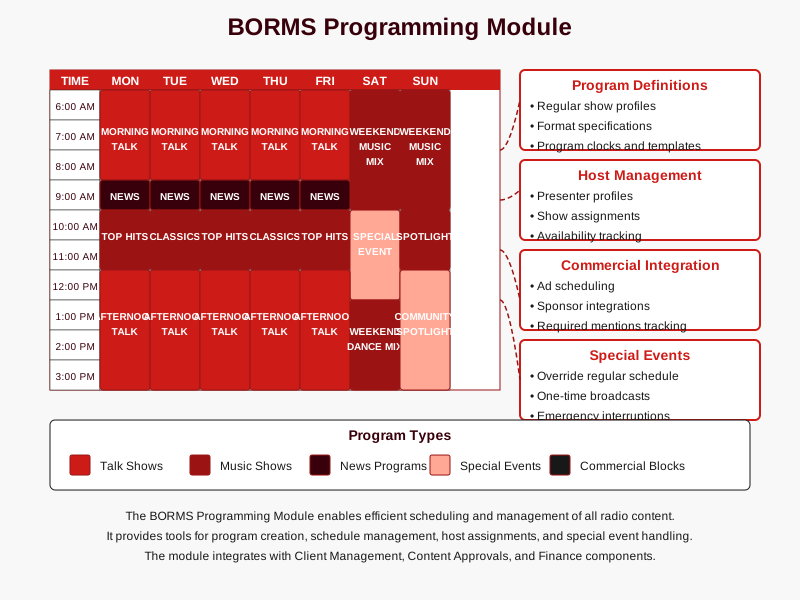
The Programming module is the heart of the Busoga One Radio Management System (BORMS), enabling efficient scheduling, organization, and management of all broadcast content. This module ensures smooth programming operations while maintaining the station's format and content standards.
Module Overview
The Programming module coordinates all aspects of radio program scheduling and content management, including:
- Creation and management of regular shows and program formats
- Detailed scheduling of daily, weekly, and special programming
- Host/presenter assignment and management
- Commercial and sponsored content integration
- Program clock templates for consistent formatting
- Special event and pre-emption handling
Program Categories
BORMS categorizes radio programming into several distinct types to facilitate scheduling and reporting:
| Program Type | Description | Examples |
|---|---|---|
| Talk Programs | Discussion-based shows with hosts and possible guests | Morning Shows, Interview Programs, Call-in Shows |
| Music Programs | Shows primarily featuring music with DJ commentary | Top Hits, Genre-specific Shows, Mix Programs |
| News Programs | News bulletins, current affairs, and analysis | Hourly News, Current Affairs, Community Updates |
| Special Programs | One-time or irregular broadcasts for events | Live Events, Festivals, Election Coverage |
| Sponsored Programs | Shows fully or partially sponsored by advertisers | Brand-sponsored Music Hours, Infotainment Shows |
Program Scheduling Workflow
The program scheduling process follows a structured workflow to ensure comprehensive coverage and optimal content arrangement:
Program Definition
Create program profiles with names, descriptions, and format specifications.
Station ManagerHost Assignment
Assign presenters or DJs to specific programs, including alternates.
Station ManagerSchedule Creation
Place programs into the weekly grid with specific timeslots.
Station Manager Front DeskContent Integration
Add commercials, PSAs, station IDs, and other content elements.
Front Desk Presenter/DJSchedule Review
Review and approve the complete schedule before broadcast.
Station ManagerSchedule Execution
Execute the approved schedule during broadcast operations.
Presenter/DJProgram Clock Templates
Program clocks provide a structured template for time allocation within shows, ensuring consistent formatting and content balance:
Talk Show Program Clock (60 Minutes)
- 00:00-00:30: Show intro and topic preview
- 00:30-03:00: Opening segment with host
- 03:00-07:00: First discussion segment
- 07:00-10:00: Commercial break (3 minutes)
- 10:00-20:00: In-depth topic discussion or interview
- 20:00-22:00: Station ID and promo
- 22:00-29:00: Continued discussion
- 29:00-32:00: Commercial break (3 minutes)
- 32:00-42:00: Call-in segment or guest interview
- 42:00-45:00: Commercial break (3 minutes)
- 45:00-55:00: Final discussion segment
- 55:00-57:00: Commercial break (2 minutes)
- 57:00-60:00: Show summary and sign-off
Music Show Program Clock (60 Minutes)
- 00:00-00:30: Show intro with DJ
- 00:30-04:00: First song
- 04:00-04:30: DJ commentary
- 04:30-08:00: Second song
- 08:00-11:00: Commercial break (3 minutes)
- 11:00-14:30: Third song
- 14:30-15:00: DJ commentary
- 15:00-18:30: Fourth song
- 18:30-19:00: Station ID and weather update
- 19:00-22:30: Fifth song
- 22:30-23:00: DJ commentary
- 23:00-26:30: Sixth song
- 26:30-29:30: Commercial break (3 minutes)
- 29:30-46:00: Four more songs with brief DJ comments
- 46:00-49:00: Commercial break (3 minutes)
- 49:00-58:00: Three final songs with DJ commentary
- 58:00-60:00: Show wrap-up and next show teaser
News Program Clock (30 Minutes)
- 00:00-00:30: News intro and headlines
- 00:30-05:00: Top stories in detail
- 05:00-07:00: Commercial break (2 minutes)
- 07:00-10:00: Local news segment
- 10:00-11:00: Weather report
- 11:00-15:00: National/international news
- 15:00-17:00: Commercial break (2 minutes)
- 17:00-19:00: Business and finance update
- 19:00-21:00: Sports news
- 21:00-23:00: Community announcements
- 23:00-25:00: Commercial break (2 minutes)
- 25:00-29:00: Feature story or interview
- 29:00-30:00: News wrap-up and closing
Morning Show Program Clock (180 Minutes)
- 00:00-05:00: Show intro, host greetings, and overview
- 05:00-15:00: News and weather report
- 15:00-18:00: Commercial break (3 minutes)
- 18:00-30:00: Entertainment news and traffic update
- 30:00-40:00: First topic discussion or interview
- 40:00-45:00: Commercial break (5 minutes)
- 45:00-60:00: Music block (3-4 songs with commentary)
- 60:00-75:00: Call-in segment or listener interaction
- 75:00-80:00: Commercial break (5 minutes)
- 80:00-95:00: Second topic or featured guest
- 95:00-110:00: Music block (3-4 songs)
- 110:00-115:00: Commercial break (5 minutes)
- 115:00-125:00: Community spotlight segment
- 125:00-140:00: Third topic or guest interview
- 140:00-145:00: Commercial break (5 minutes)
- 145:00-160:00: Music block (3-4 songs)
- 160:00-175:00: Final topic and listener messages
- 175:00-180:00: Show wrap-up and hand-off
Schedule View Options
BORMS provides multiple views for schedule management to suit different operational needs:
- Day View: Detailed hourly breakdown of a specific day's programming
- Week View: Seven-day overview of the complete broadcast schedule
- Month View: Calendar view showing special events and programming changes
- Program View: Filtered view showing occurrences of a specific program
- Host View: Filtered view showing all programs for a specific presenter
Schedule Exceptions and Special Events
The Programming module includes tools to handle schedule exceptions and special broadcasts:
- Pre-emptions: Override regular programming for special content
- Split Programming: Segment a timeslot for multiple short programs
- Extended Programming: Extend a program beyond its usual duration
- Special Event Coverage: Schedule one-time special broadcasts
- Holiday Programming: Configure special schedules for holidays
- Emergency Broadcasts: Override capabilities for urgent announcements
Best Practices for Program Scheduling
- Maintain consistent program time slots to build listener habits
- Provide at least one week's notice for major schedule changes
- Balance commercial load throughout the broadcast day
- Ensure smooth transitions between programs with appropriate hand-offs
- Review program ratings and audience feedback regularly to optimize scheduling
- Always have contingency plans for technical issues or presenter absences
Access Permissions
Schedule management functions are restricted based on user roles:
| User Role | View Schedule | Create Programs | Edit Schedule | Approve Changes | Override Schedule |
|---|---|---|---|---|---|
| Admin | ✓ | ✓ | ✓ | ✓ | ✓ |
| Station Manager | ✓ | ✓ | ✓ | ✓ | ✓ |
| Front Desk | ✓ | ✗ | Limited | ✗ | ✗ |
| Presenter/DJ | ✓ | ✗ | Own Shows Only | ✗ | Emergency Only |
Reporting Features
The Programming module generates several reports to aid in analysis and planning:
- Program Performance Report: Audience metrics and ratings by program
- Host Activity Report: Hours and programs by presenter
- Content Distribution Report: Breakdown of programming by type
- Schedule Adherence Report: Analysis of actual vs. scheduled programming
- Commercial Load Report: Distribution of commercial content throughout the schedule
- Special Events Report: Summary of upcoming special broadcasts
Integration with Other Modules
The Programming module connects with other BORMS components for seamless operations:
- Client Management: Links sponsored content to client records
- Content Approvals: Ensures all broadcast content meets station standards
- Finance: Coordinates billing for sponsored programs and advertising
- Reporting: Provides programming data for comprehensive station analytics
- DJ Mentions: Tracks required sponsor mentions during live broadcasts